
Effortlessly Build Your WordPress Site with SiteGround
Ready to Build Your Website Without the Headaches? SiteGround Makes It Effortless! If you’ve been itching to create your very own website but keep getting held back by tech worries or setup fears, we’ve got great news: SiteGround’s WordPress setup is here to make it as easy as pie! You don’t need a tech background or hours of spare time—just a few minutes, and you’re on your way.
Why Do You Need SiteGround As Your Host to Build a WordPress Site? It’s All About Simplicity and Speed
Imagine this: A sleek, professional-looking WordPress site up and running in under two minutes, with just three simple steps. That’s what SiteGround brings to the table. And guess what? You don’t have to lift a finger beyond those easy clicks—SiteGround’s custom-designed WordPress Starter plugin will do all the heavy lifting.
What Makes SiteGround So Beginner-Friendly?
- Streamlined 3-Step Installation: No complex configurations, no extra downloads. SiteGround’s process is a breeze, taking you from zero to website in no time.
- WordPress Starter Plugin: Created just for SiteGround users, this plugin makes building your site a no-brainer. Themes, plugins, and essential features? All taken care of.
- Fast and Fully Supported: You’ll have your site live in minutes, and SiteGround’s support team is always there to answer questions, so you’re never left hanging.

What You Get With SiteGround’s WordPress Starter
Starting a website should feel exciting, not overwhelming. With SiteGround, you’ll be guided every step of the way, setting you up with a theme, essential plugins, and tools to customize your site to perfection. This is pro-level website building without the pro-level stress!
Let’s walk through SiteGround’s WordPress setup together—before you know it, you’ll have a polished website up and ready to share with the world!
STEP 1: EASY WORDPRESS INSTALLATION
First things first: You’ll need to install the application that will power your website—WordPress in this case. As soon as you log into your Client Area for the first time, you’ll be greeted with a warm welcome message and a handy “SET UP WEBSITE” button. Just click on it, and you’ll be whisked straight to the WordPress installation process. No hunting around for options, no techy confusion—SiteGround makes it super simple to get started!
On the next step, select Start New Website and WordPress as your application of choice.
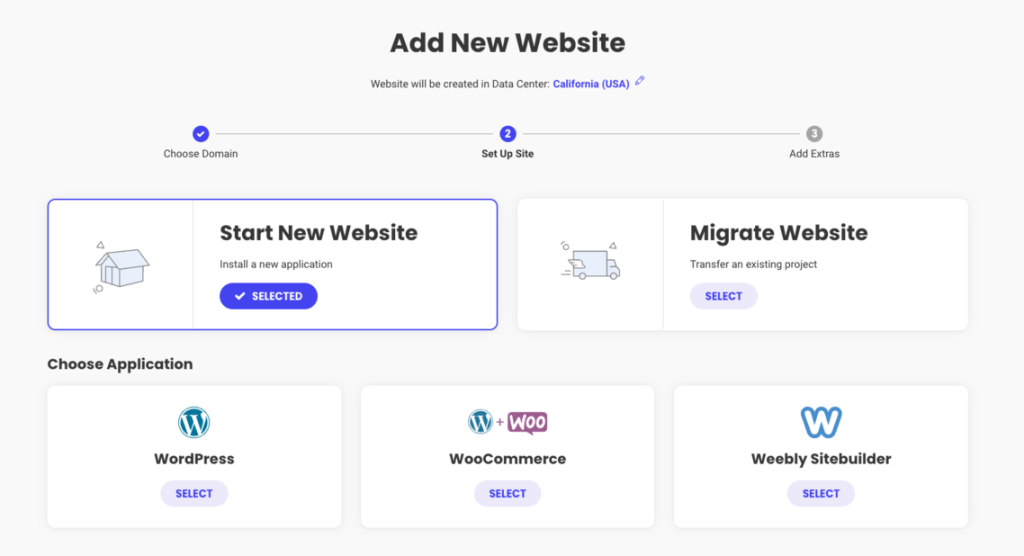
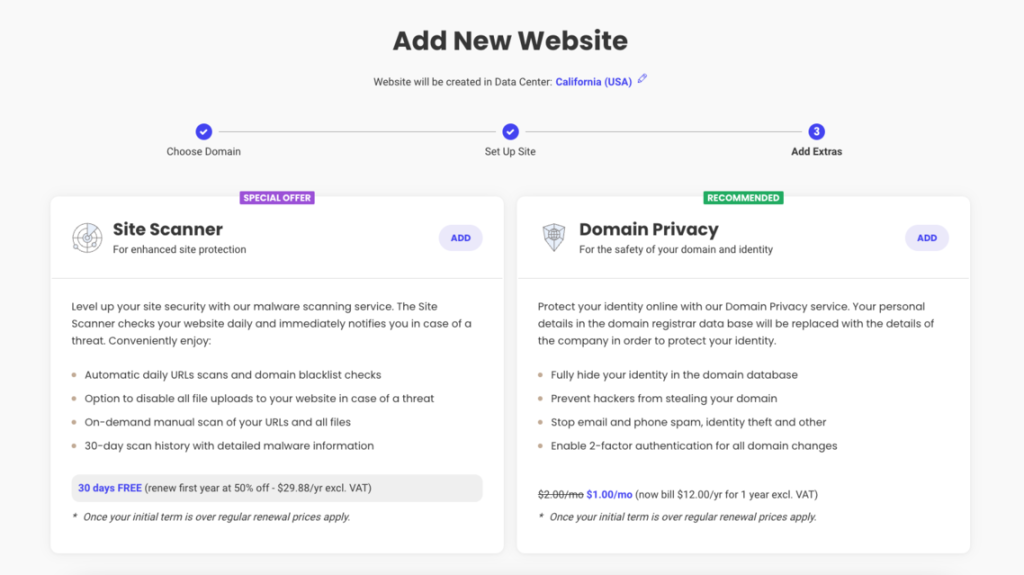
To wrap up your installation, you’ll have the option to enhance your site’s security with extra services like SG Site Scanner. This powerful tool checks your website daily, keeping an eye out for potential hacks or malicious code. If anything suspicious pops up, you’ll be notified right away, so you can take action before it becomes a problem. It’s a smart way to add an extra layer of protection and peace of mind to your new website!
Finally, just click “Finish” and sit tight for a moment while WordPress installs. In no time, your website will be ready to go, set up with everything you need to start building and sharing your content. Simple, quick, and hassle-free!
STEP 2: CHOOSE A THEME
Once WordPress finishes installing, you’ll be taken straight to the WordPress Starter wizard. Just click on “Start Now”, and you’ll be ready to choose a look that suits your brand! SiteGround offers a fantastic selection of free, professionally-designed themes, so you’re bound to find one that fits your vision perfectly. For a clean, flexible design, you might like Kadence or Astra—both are top-notch choices with modern styling and endless customization options.

Keep in mind that whichever theme you pick will come with pre-filled sample content—a fantastic way to see how your site will look with real content in place. Thanks to SiteGround’s intuitive drag-and-drop page editor, which comes standard, you can easily visualize the layout and make adjustments before adding your own copy. This setup lets you experiment and get a feel for the design without any guesswork, making it super easy to customize your site exactly the way you want.
STEP 3: ADD PLUGINS TO EXPAND FUNCTIONALITY
After nailing down the perfect design for your site, you’ll move on to the next step: adding useful plugins that can enhance your website’s functionality. Here are a few must-haves to consider:
- Contact Form – Make it easy for visitors to reach you by adding a simple, user-friendly contact form.
- WooCommerce – Thinking about selling products? This plugin transforms your site into a fully functional online store.
- Google Analytics Plugin – Keep tabs on your website traffic and gain insights into visitor behavior with this essential tracking tool.
- Grow Subscribers List – Capture emails and grow your subscriber base effortlessly with a plugin dedicated to building your mailing list.
These plugins are easy to install and can add real value to your site, helping you engage with visitors, track performance, and even start selling directly from your page!
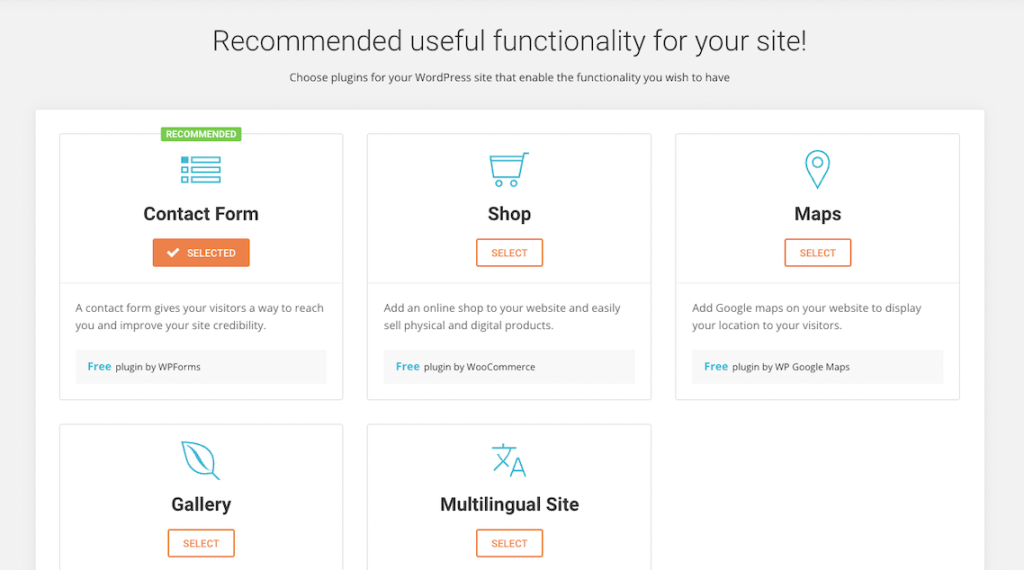
Once you’ve selected the plugins and features you want, simply click “Complete”. In just a few minutes, your new website will be live, fully loaded with the design and functionalities you’ve chosen. Now, it’s time to start adding your own content! Just log in at http://yourdomain.com/wp-admin and dive into the custom WordPress dashboard. From here, you can easily manage pages, publish posts, and bring your vision to life with just a few clicks.
Need a Pro to Bring Your Vision to Life? I’ve Got You Covered!
If you’d rather skip the setup process or want a polished, professional touch, I’m here to help! I can create a custom WordPress site that perfectly captures your brand and meets your specific needs—no stress, no hassle, just a beautifully designed website ready to go.
From choosing the right theme and plugins to customizing the look and feel of your site, I handle every detail to bring your vision to life. So, if you’d like to save time and ensure your site looks top-notch, head over to my Website Creation Services page to learn more. Let’s make your dream website a reality!